
By Debbie Neese
Quick answer: Ask customers for reviews once the job is wrapped up. Then call the client, check that everything went well, and ask if you can send a review link. Once they say yes, email a direct link that same day. Follow up once. The easier you make it, the more reviews you’ll get.
Your clients love your crew. They say so at the walkthrough. They say so when they call about the next mowing. One even brought your guys lemonade.
But your Google profile tells a different story. Maybe it shows eleven reviews, and the newest one is from 2021.
Here’s the problem. A homeowner who has never met you can’t hear those compliments. Instead, they only see your star rating and how many reviews you have. So if you’ve wondered how to ask customers for reviews without feeling pushy, you’re in the right place.
This guide walks you through the exact process my team uses. It includes a phone script, an email template, and a real client story that still makes me smile.
Why Reviews Matter More Than Your Truck Logo
Your truck lettering tells people you exist. Your reviews tell them you’re worth calling.
In fact, the BrightLocal Local Consumer Review Survey found that 97% of consumers read reviews for local businesses. On top of that, 74% look for reviews written in the last three months. So a handful of old reviews won’t carry you for long.
Reviews also help you show up in Google’s local results. As a result, they work as both proof and visibility.
Reviews are one piece of a bigger plan, of course. For the full picture, see these marketing strategies for landscaping business owners.
The #1 Mistake: Making It Hard to Leave a Review
Most owners assume clients will find their Google page on their own. Some will. However, most won’t bother once they hit the first roadblock.
Think about what you’re asking. A busy homeowner has to search for your business, find the right listing, scroll to the reviews, and figure out where to click. By step two, the dog needs out, and the review is forgotten.
So when it comes to asking customers for reviews, the link matters as much as the words. Always send a direct link that opens the review box in one tap. Everything below builds on that.
How to Ask Customers for Reviews in 5 Steps
This is the process we’ve used for years with landscape clients. It works because it feels like good service, not a sales pitch.
1. Get Your Direct Review Links
First, grab a direct link for each platform you care about. Start with Google, since most homeowners look there.
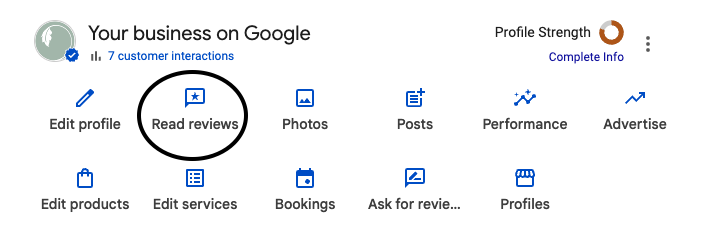
Google Business Profile (on a computer):
- Go to google.com and open your profile.
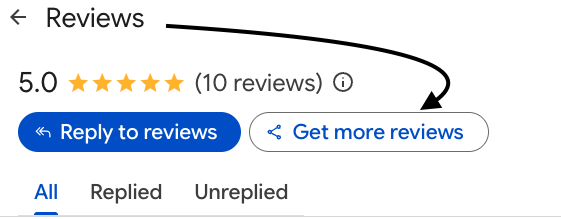
- Click Read reviews, then Get more reviews.
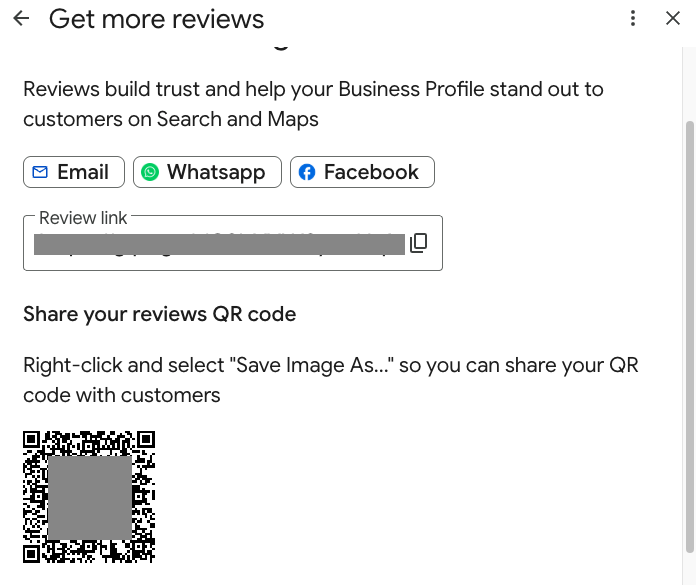
- Click Copy to grab your review link.
- To get a QR code, right-click the code and choose Save image as.
Google’s help page on creating a review link or QR code has the latest steps. Note that the QR code only works from a computer browser right now.
Other platforms worth a link:
- Angi: Look for the review request option in your Angi Pro account. Our guide to Angi reviews for landscapers covers setup in detail.
- Facebook: Clients leave “recommendations” on your business page. So share your page link and point them to the Reviews tab.
- Houzz: Design-build and hardscape pros should check the review request feature in their Houzz Pro dashboard.
Then save every link in one note on your phone. That way, you’re never hunting for them later.
2. Pick the Right Moment
Timing is everything. Ask while the finished project still looks sharp and the client still feels great about it.
Good moments include:
- The final walkthrough on an install or hardscape job
- Right after a compliment, like “the crew did an amazing job”
- The end of the season for your maintenance clients
- After you fix a problem quickly and well
A compliment is a great cue to ask. Still, it shouldn’t decide who gets asked. We’ll cover why in a minute.
3. Call First or Ask in Person
This is the step most guides on asking customers for reviews skip. Yet it makes the biggest difference.
Before I send any link, I pick up the phone. On larger jobs, the project manager asks in person at the walkthrough instead. Either way, the conversation goes something like this:
The check-in: “Hi [Client Name], this is [Your Name] with [Company]. I wanted to make sure you were pleased with everything. Is there anything else we can do for you?”
If something’s off: Stop and fix it. Then circle back once it’s taken care of.
The ask: “We’d really appreciate your feedback. Would you mind if I sent you a link to leave a brief review?”
That’s it. Most clients say yes on the spot. And here’s the magic: once someone says yes, they’re far more likely to follow through.
Ask every client this way, not just the ones who rave. Fixing problems first is great service. However, asking only your biggest fans crosses a line. More on that below.
4. Send the Link the Same Day
Next, send the link while the phone call is still fresh. An email works well because clients can click when they have a minute.
Review request email template:
Subject: Thanks again, [First Name]!
Hi [First Name],
Thank you for chatting with me today. We loved working on your [patio / landscape install / lawn program], and I’m so glad you’re happy with it.
As promised, here’s the link to leave a quick review: [Google review link]
It only takes a minute, and it helps other homeowners find a crew they can trust.
Thanks so much, [Your Name] [Company] | [Phone]
To save time, turn this email into a Gmail template. Then you can drop it into a new message in two clicks.
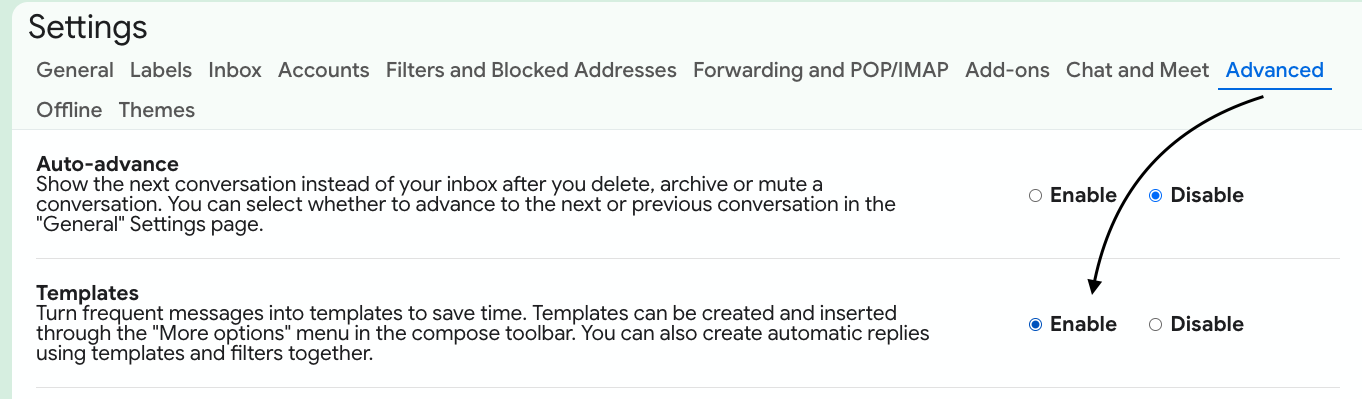
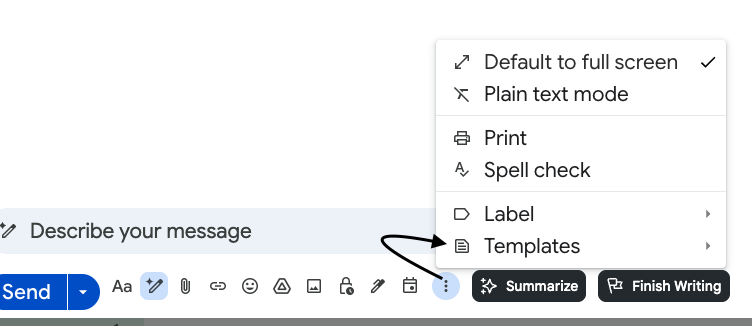
How to save it as a Gmail template:
- Click the gear icon, then click See all settings.
- Open the Advanced tab, find Templates, and click Enable. Then click Save Changes.
- Compose a new email and paste in the template above (erase your signature first).
- Click the three dots (More options), then Templates > Save draft as template > Save as new template.
- Next time, open a new email, click More options > Templates, and pick your review request.
5. Follow Up Once
Life gets busy, so some clients forget. That’s normal.
If no review shows up after four or five days, send one friendly reminder:
Hi [First Name], just a quick nudge in case my last email got buried. Here’s that review link again: [link]. No worries if now isn’t a good time. We appreciate you either way!
After that, let it go. One reminder feels helpful. Three feels like nagging.
How to Ask for a Google Review by Text
Some clients live on their phones. For them, a short text works better than email.
“Hi [First Name], it’s [Name] from [Company]. Thanks again for letting us know you’re happy with the new beds! Here’s the review link we talked about: [link].”
Keep it short, and send it after the phone call, not instead of it. Also, only text clients who’ve agreed to hear from you that way.
Put Your Review Link Everywhere
Beyond the direct ask, make your link easy to find year-round.
- Email signature: Add a line like “Happy with our work? Leave us a review.”
- Website: Place a “Review Us” button on your homepage and contact page.
- Newsletter: Include your link in every issue of your landscaping email newsletter.
- Invoices: Print a short note and the QR code at the bottom.
- Leave-behind card: Hand clients a card with the QR code and two simple steps to follow.
A strong Google Business Profile for your landscaping company also gives those reviews a professional home.
What Not to Do: Rewards, Fake Reviews, and “Review Gating”
Knowing how to ask customers for reviews also means knowing what to avoid. After all, a few shortcuts can get your reviews removed or land you in hot water.
- Don’t offer rewards for reviews. Discounts, gift cards, or free services in exchange for a review break Google’s review policy. The FTC’s rule on consumer reviews also bans rewards tied to positive reviews.
- Don’t ask only your happy clients. This is called “review gating.” Google doesn’t allow businesses to selectively ask for positive reviews. Likewise, the FTC’s guide on soliciting reviews says not to ask only customers you expect to be positive.
- Don’t write reviews for clients or post reviews from family and crew members.
Good to know: Rewarding a client for a referral is a different story, and it’s perfectly fine. See how to set one up in our guide to getting referrals for your landscape business.
How to Respond to a Negative Review
Even great crews get a bad review now and then. What matters most is how you respond.
According to BrightLocal, 80% of consumers are likely to use a business that responds to all of its reviews. So reply to every review, good or bad.
For a negative one:
- Wait an hour so you can reply calmly.
- Thank them and acknowledge the concern.
- Take it offline by asking for a phone number or email.
- Fix the problem if you can.
Sample reply: “Thank you for letting us know, [Name]. We’re sorry the edging didn’t meet your expectations. I’d like to make it right. Please call me directly at [phone] so we can set up a time to take a look.”
Future clients read your reply as much as the review. A calm, helpful response often earns more trust than a perfect score.
Real Results: From $250K to $1 Million on Reviews Alone
Here’s a story I share often, because it shows what steady reviews can do.
My team answered the phones for a landscape contractor. We talked with his clients every day. Over and over, they told us how much they liked him and his crew.
So we decided to package that praise. After each job, I’d call to check in, or his project manager would ask in person. Then I’d email a direct link to his Google Business Profile or Angi page, with one reminder if needed.
The reviews came in by the droves. Here’s what happened next:
- His revenue grew from about $250,000 to $1 million in four years. Before that, the winter months were a real struggle.
- He didn’t spend a dime on other advertising. Reviews drove the growth.
- Leads got more serious. Eventually, demand supported a $100 consultation fee, credited back if the client hired him. That weeded out tire-kickers and added credibility.
- Proposals went out faster. Because those leads had paid, he knew they were ready to move.
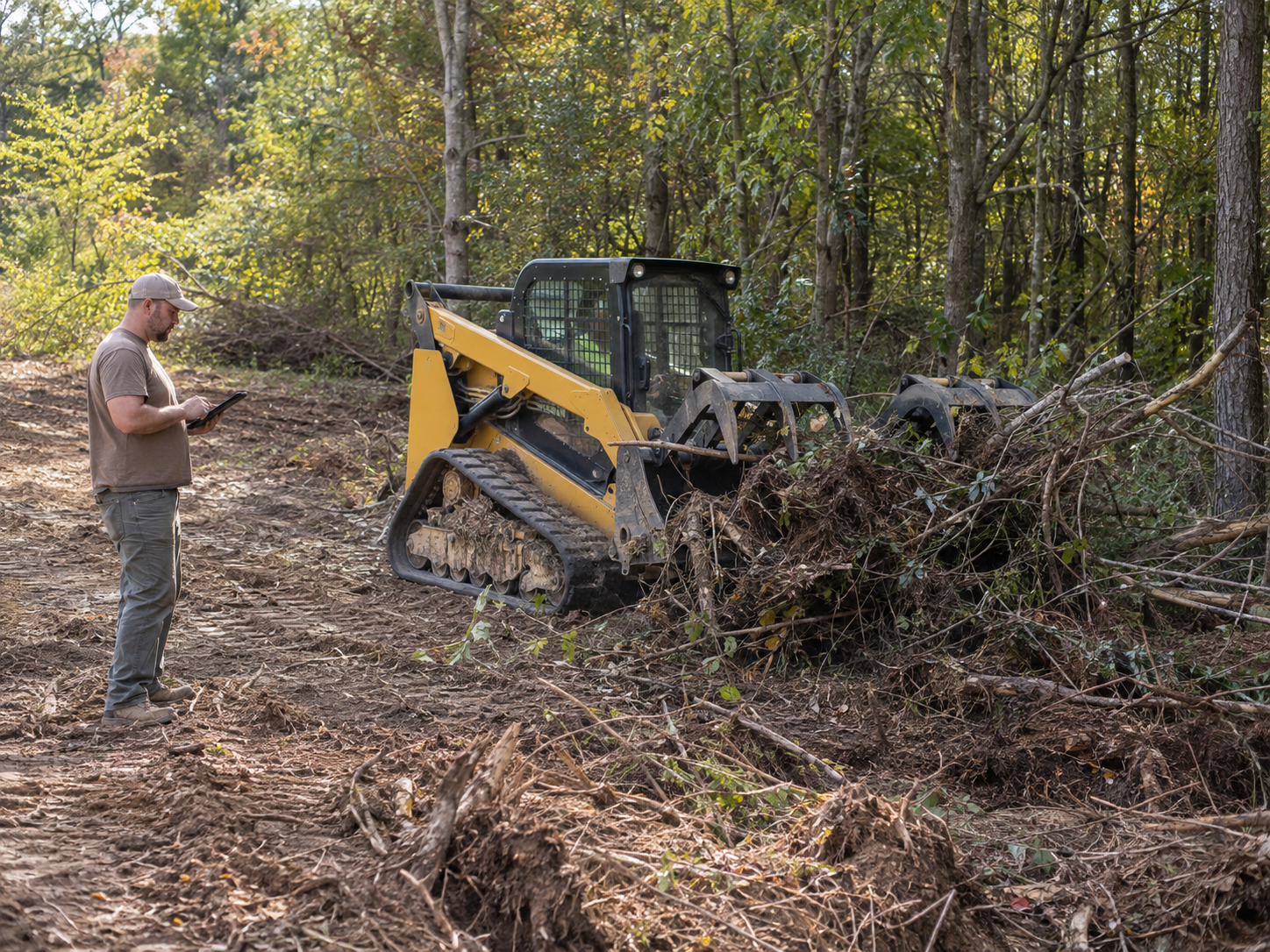
- He grew into a new line of work. The extra revenue paid for more machinery and a profitable land clearing division.
Of course, reviews didn’t do the work alone. His crew earned every one. They just needed someone to ask.
That’s where Offshoot Virtual Landscape Services comes in. We can make the check-in calls, send the links, follow up, and reply to reviews. Meanwhile, you stay focused on the jobs that earn them.
Now Put Those Reviews to Work
Turn Your Best Reviews Into Project Stories
Film One Client Who’s Good on Camera
- Send the questions ahead of time so nobody freezes. Three is plenty: what made you call us, what we did, and how it turned out.
- Keep it under three minutes. Shorter is stronger, and nobody watches past that anyway.
- Shoot on the property, with the finished work in the background.
- Stand just off camera and ask the questions yourself, so it plays as a conversation instead of a speech.
- Have someone else hold the phone, because handheld wobble makes a video look amateur.
Pull the Quotes and Use Them Everywhere
- Under the matching service on your website
- On a job photo for social media
- In your proposals, beside the scope of work
- In your newsletter, one per issue
- On print materials and truck-side graphics
What Happens If You Keep Waiting
Without a system, your reviews stay stuck in 2021. Meanwhile, a competitor with fresh five-star reviews gets the call, even if your work is better.
Now picture the other side. A few new reviews show up every month. Homeowners call already convinced. Your slow season isn’t so slow anymore. That’s what happens once you know how to ask customers for reviews and do it every time.
FAQs About Asking Customers for Reviews
How do you politely ask a customer for a review?
Start with a check-in: ask if they were pleased and whether you can do anything else. Once you’ve addressed any issues, ask if you can send a link for a brief review. Then email the direct link the same day.
When is the best time to ask a landscaping client for a review?
Ask right after the job wraps up, while the results still look fresh. The final walkthrough, a client compliment, or the end of the maintenance season are all good moments.
How many times should I follow up on a review request?
Follow up once, about four or five days after your first request. After that, let it go. More reminders can feel pushy and hurt the relationship.
Can I offer a discount in exchange for a review?
No. Google’s review policy doesn’t allow discounts, gifts, or free services in exchange for reviews. The FTC also bans rewards tied to positive reviews. However, you can reward clients for referrals. For more ideas, see Smart Ways to Get Customer Reviews for Your Business from BusinessTimes.
How do I get more Google reviews fast?
Get your direct Google review link, call each recent client to check in, and ask them. Then email the link the same day and follow up once. Consistency beats one big push.
What should I do about a bad review?
Reply calmly within a day or two. Thank the client, acknowledge the issue, and invite them to call you. Then fix the problem if you can.
How do I use customer reviews in my marketing?
Turn your strongest reviews into short project stories with photos, film one client who’s comfortable on camera, and pull standout quotes onto your website, proposals, newsletter, and social posts. Get the client’s permission first, and use only a first name, last initial, and town.
Ready to Turn Happy Clients Into Five-Star Reviews?
Your crew already does the hard part. Now it’s time to make sure the world hears about it.
If you don’t have time to make the calls, send the links, and keep up with replies, you don’t have to do it alone. Book a consultation with Offshoot Virtual Landscape Services, and let’s set up a simple plan for how to ask customers for reviews that runs while you’re in the field.
About the author: Debbie Neese is the founder of Offshoot Virtual Landscape Services, LLC, a virtual assistant and back-office firm for green-industry businesses across the U.S. She holds a Horticulture Certification and an Associate of Science in Business Administration, has more than 14 years of green-industry experience, and has been published in Martha Stewart, Southern Living, The Spruce, Well+Good, and Family Handyman.


