

By Debbie Neese, Horticulture Certification | 16 years in the green industry | Founder, Offshoot Virtual Landscape Services (est. 2012)
A Davis-Bacon Act wage determination is the Department of Labor’s list of minimum hourly wage and fringe benefit rates for each worker classification, in one county and one type of construction. You find it on SAM.gov, match each worker to the classification for the work they actually perform, and pay at least that rate.
The job is yours. Your crew is ready, and the equipment is loaded. Then the prime says, “Pay the wage determination,” and you open SAM.gov to a wall of numbers.
Which one is yours? Is your crew’s work even on the list? And what happens if it isn’t?
Take a breath. A Davis-Bacon Act wage determination sounds scarier than it is. It works like a price list, so you can learn to read one in a single afternoon.
Callout: Most contractors don’t get tripped up by the math. They get tripped up by the order of the steps. Find the right Davis-Bacon Act wage determination first, then read it, then match your crew to it, and mark any gaps before the first payday.
What Is a Davis-Bacon Act Wage Determination?
A wage determination is a list of pay rates. The Department of Labor builds each list from local wage surveys. It covers one area and one type of construction, and it names each worker classification with two numbers: a base hourly rate and a fringe benefit rate.
Add the base rate and the fringe rate to get the prevailing wage for that classification. You deliver the fringe part in one of two ways. You can put it on the paycheck as extra cash. Or you can fund a genuine benefit plan for the worker, like health insurance or retirement savings.
The Department of Labor sorts these lists into four construction types: building, residential, highway, and heavy. Your contracting agency picks the type that fits your project. For example, slope work on a state highway usually falls under a highway determination. So ask your prime which one is attached to your contract.
Why Does the Classification Matter More Than the Job Title?
Because the law follows the work, not the worker, you pay the rate for the classification of work a person actually performs, and skill level doesn’t change that rate. Therefore, a first-week hire and a ten-year veteran doing the same listed work earn the same listed rate. Registered apprentices in a bona fide program are the one exception.
Where Do You Find the Right Davis-Bacon Act Wage Determination?
Start with your contract. The agency must include the right determination in the bid documents, and your prime must pass it down in your subcontract. That means the number should already be in your paperwork.
It looks like two state letters, a four-digit year, and a short number. If you can’t find it, ask your prime or the contracting agency, because subcontractors get the determination from them.
Then follow these steps on SAM.gov’s wage determinations page to pull your Davis-Bacon Act wage determination:
- Find the box labeled “I know the WD number” and type in your number. Searching is free, and the Department of Labor publishes every general determination there.
- No number yet? Choose the Davis-Bacon option instead, then narrow the results until you reach your county and construction type.
- Check the modification number and the date at the top. Each determination page also lists its modification history.
- Need an older version because your contract carries one? Uncheck “Show active only” to see it.
- Print it and post it where your crew can see it, along with the Davis-Bacon poster (WH-1321).
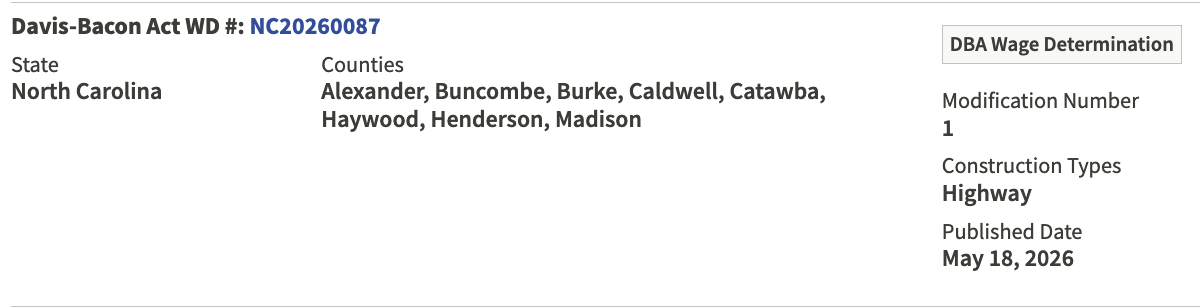
Warning: Newer isn’t always better. Before award, a newer modification to your Davis-Bacon Act wage determination can land in your contract. After award, it generally can’t. So the version written in your contract is the one that counts.
Bidding on a job right now? Create a free SAM.gov login and “follow” your determination. Then SAM.gov alerts you when it changes.
How Do You Read a Davis-Bacon Act Wage Determination?
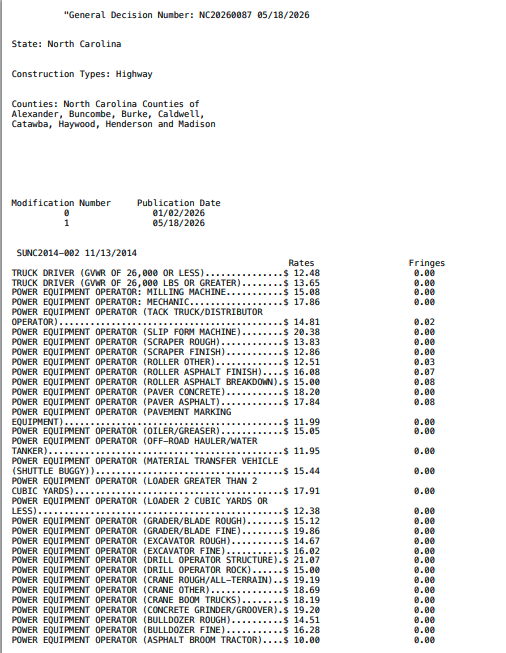
Read it from the top down. Five checks cover everything:
- Area. The state and counties sit at the top. Confirm your project is inside them.
- Construction type. Building, residential, highway, or heavy appears near the top too.
- Classifications. The list names classifications, not tasks. So you match the scope of your work to the list.
- Identifier codes. A code that starts with SU means a survey average set the rate. Codes like PLUM mean a union agreement set it. Either way, the listed rate applies to you, union or not.
- Rate and fringe. Each classification shows a base rate and a fringe rate. Add them for your prevailing wage.
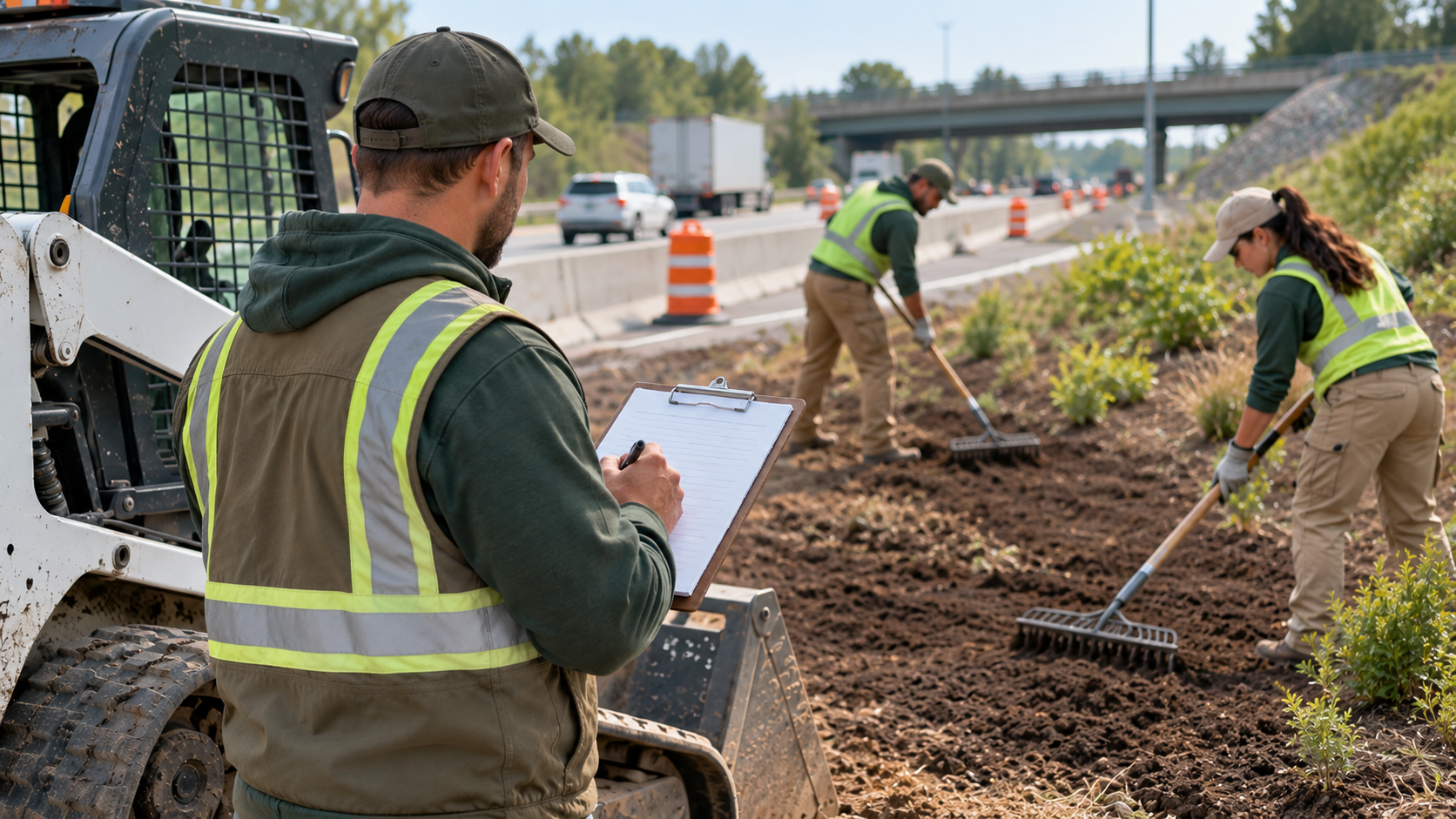
Now think about a real day. Your operator runs the skid steer all morning, then hand-rakes seed with the crew after lunch. If both classifications are listed, you can pay each rate for the time spent in each.
However, your payroll records have to show that split accurately. So track time by task, not just by day.

How Does a Crew Leader Track Two Classifications in One Day?
The tracking starts before the crew leaves the yard. If your crew leader learns the classifications at the end of the week, it’s too late to fix the time sheets.
What Should the Crew Leader Record Each Day?
Here is what a workable setup looks like:
- Build a one-page crew sheet before the job starts. The office pulls the Davis-Bacon Act wage determination and lists each classification the job will use, its base and fringe rates, and the tasks that fall under it. Then add each worker’s name and the classification they start in.
- Walk the sheet with the crew leader. Cover the tasks most likely to change a classification, such as running the skid steer versus hand-raking seed. Agree on the switch points ahead of time.
- Record time at each switch, not at the end of the day. Write the start and stop time for each task, for each worker. Memory is the weak link, so the crew leader logs it when the work changes.
- Pick one time increment and stick with it. Many contractors round to the nearest quarter hour. Whatever you choose, use it for every worker and every job, and make sure the day’s total matches clock-in and clock-out.
- Tag every entry with the job and the classification. If a worker splits a day between two jobs, each job gets its own lines, because each may carry a different determination and rate.
- Collect a sign-off. The crew leader and the worker both initial the sheet at the end of the day.
- Send it to the office by the next morning. The office checks the totals, then enters the hours into payroll by classification.
Warning: Don’t count on the lower rate if your records don’t show the split. The rules let you pay each rate for the time actually worked in each classification, but only when your payroll records accurately show the time spent in each. Without that proof, expect to owe the higher rate for the whole day.
How Does the Office Stay in Sync With the Field?
Timing matters at the office, too. Overtime is counted weekly, so the office needs every crew leader’s sheets before running payroll. Because certified payroll is a weekly report, a missing sheet on Monday becomes a late filing by Friday.
From our own files: When we set up certified payroll for a contractor, we start with the crew leader’s daily sheet, because everything else depends on it. One page per crew per day, with every task switch timed, lets the office build the weekly report without chasing anyone’s memory.
What Is the Difference Between a General and a Project Wage Determination?
Almost every job uses a general Davis-Bacon Act wage determination. A project determination is rare. Here is how they compare:
| General | Project | |
|---|---|---|
| Who asks for it | No one; DOL publishes it | The agency, on Form SF-308 |
| Where you find it | SAM.gov | Your contract documents |
| Expiration | None until revised or replaced | Void after 180 days if unused |
| How common | Almost every job | Rare |
| What it covers | One county, one construction type | One named project |
You don’t request either one yourself. The agency does. If you suspect a project determination is in play, ask your prime early.
What If Your Classification Isn’t on the Wage Determination?
First, double-check. Most work fits a classification that is already listed. The name of the work isn’t a classification, either. Official Department of Labor examples show that broadband and weatherization projects use listed classifications like laborer, operator, electrician, and carpenter.
Still missing? Then you need a conformance, which is a request to add a classification and rate to your Davis-Bacon Act wage determination for your contract only. DOL grants one only when all three tests are met:
- No listed classification already does that work.
- Contractors in your area actually use the classification.
- The proposed rate, including fringe, bears a reasonable relationship to the listed rates.
How Does a Conformance Request Work?
You prepare the request with a written description of the duties and a proposed rate. The Department of Labor’s guide and SAM.gov still point to Form SF-1444. Your contracting officer, usually through your prime, then emails it to DBAConformance@dol.gov.
If you, your workers, and the officer agree on the classification and rate, the officer reports it. Otherwise, the officer refers the disagreement for a decision. Either way, the Wage and Hour Division has 30 days to approve, modify, or deny the request, or to say it needs more time. After that, the approved rate applies from the first day anyone worked in that classification.
Warning: A conformance can’t be used to pay less than a listed rate, and it can’t split a listed classification into smaller pieces. The Department of Labor says plainly that wanting a lower wage isn’t grounds. Also, the general determination on SAM.gov doesn’t change.
Callout: Doing your own research? The conformance rule now lives at 29 CFR 5.5(a)(1)(iii) in the eCFR. Some older guides, including the Department of Labor’s 2021 conformance guide, still cite (a)(1)(ii).
Do Wage Determination Modifications Change Your Rates Mid-Project?
Not usually, once you’re awarded. Before award, though, they can.
What Happens Before You Win the Job?
On sealed-bid jobs, two dates matter:
- A revision published at least 10 days before bid opening goes into the solicitation and the contract. Any later one still applies unless the agency finds there’s no reasonable time to tell bidders.
- If the contract isn’t awarded within 90 days after bid opening, any revision published up to award applies unless DOL grants an extension.
So check the modification number on bid day. Then check it again before award.
What Happens After You Win the Job?
After award, modifications generally don’t apply. The version in your contract sets your minimum rates for the life of the contract. Four things can reopen it:
- Substantial new work beyond the original parameters
- An exercised option or an added period of work
- The yearly anniversary update on long-term contracts that aren’t tied to one project, such as maintenance contracts
- A clerical-error correction from DOL, which applies back to the start of construction
Extra time to finish your original work doesn’t count, and neither does incidental work. If your scope grows, ask your prime whether the agency will update the determination.
Callout: On June 24, 2026, a federal court vacated three provisions of the Department of Labor’s 2023 Davis-Bacon rule. They covered material suppliers, some delivery drivers, and contracts where the agency left out the required clauses. The lookup, conformance, and modification steps above are separate from those three. However, DOL’s own website still describes an earlier injunction, so confirm any recent change with your prime or the Wage and Hour Division.
What Should Your Wage Determination Checklist Look Like?
Run this routine on every new job that carries a Davis-Bacon Act wage determination:
- Get the wage determination number from your contract or your prime.
- Pull it from SAM.gov, and match the modification number and date to your contract.
- Confirm the county and the construction type.
- List every classification your crew will work, and match each one to the determination.
- Mark any gap before the first payday, and ask your prime about a conformance.
- Post the determination and the Davis-Bacon poster at the site.
- Set up payroll to track hours by classification.
- Record the base rate, fringe rate, and modification number for each classification.
Keep it all in one shared spreadsheet so your office and field crew work from the same numbers.
Once your rates are set, the weekly paperwork proves you paid them. Our guide to certified payroll for landscapers walks through the WH-347 line by line. New to all of this? Start with what certified payroll is and who has to file it, then grab the free Certified Payroll Starter Checklist before you enter a single number.
Davis-Bacon Act Wage Determination: Frequently Asked Questions
Does it cost anything to look up a Davis-Bacon Act wage determination?
No. SAM.gov is free to search, and the Department of Labor publishes every general wage determination there.
How long does a conformance request take?
The Wage and Hour Division has 30 days from receipt to approve, modify, or deny the request, or to say it needs more time. Plan for the full month, and keep your payroll files accurate in the meantime.
What is the difference between a wage determination and certified payroll?
A wage determination is the pay scale. Certified payroll is the weekly report that proves you paid it. You file the report for every week you have covered work, and you sign a statement that the wages match the determination.
Can I pay a registered apprentice less than the listed rate?
Yes, if the apprentice is individually registered in a bona fide program approved by the Department of Labor or a recognized state agency. You must also stay within the program’s apprentice-to-journeyworker ratio. Otherwise, pay the full listed rate.
Does NCDOT work use a Davis-Bacon wage determination?
Federal-aid highway projects do, because federal funding brings Davis-Bacon rules into the work. The determination should be in your contract documents, so ask your prime for the number.
What happens if I pay the wrong rate?
You owe the difference as back wages, plus interest. The agency can also withhold payments until you fix it. In serious cases, a breach can lead to contract termination and debarment from federal work.
What if I pay more than the wage determination requires?
That’s fine, because a wage determination sets a minimum, not a maximum. Report the rate you actually paid on your certified payroll, and base overtime on that higher rate. Your total pay still has to meet the listed base plus fringe for each classification.
Ready to Take the Wage Determination Off Your Desk?
You didn’t start a landscaping business to read federal pay scales. So let’s take the Davis-Bacon Act wage determination work off your plate.
Book a free 45-minute consultation, and you’ll leave with a list of what can come off your plate and a realistic first step. That’s true whether or not you ever hire us. Call 828-699-8022 during Eastern Time business hours, or book a free 45-minute consultation with Offshoot Virtual Landscape Services. If weekly filings are the real bottleneck, look at our certified payroll services.
I’m an offshoot of your business.
About the Author
Debbie Neese is the founder of Offshoot Virtual Landscape Services, LLC, a virtual assistant and back-office firm serving landscapers, hydroseeders, lawn care companies, and tree services across the U.S. She started in the green industry in 2010, studying horticulture and working at a nursery, and founded Offshoot in 2012. She holds a Horticulture Certification and an Associate of Science in Business Administration. Her gardening expertise has appeared in Men’s Journal, Martha Stewart, Southern Living, The Spruce, Well+Good, and Family Handyman.


